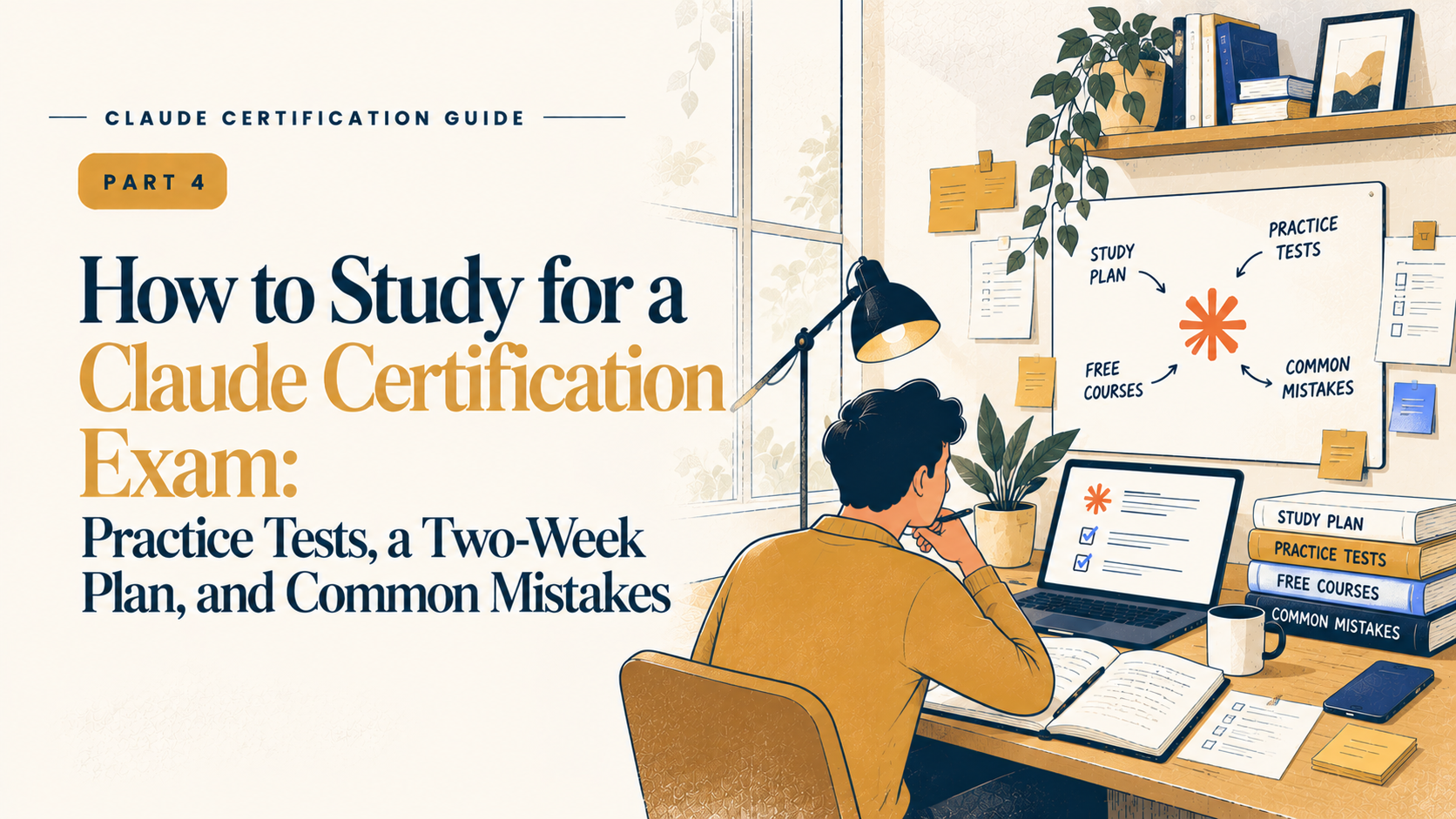
Knowing what to study is one thing. Figuring out how to prepare without wasting time is another.
In the previous part, we covered the official exam guides, free courses, and topics covered in each Claude certification. Here, we'll look at how to use practice questions, plan your study time, build something useful, and avoid common mistakes.
Three developers on our team have passed Developer – Foundations. Each spent around one to two weeks preparing, studying for two to three hours a day. Their experience gives us a useful starting point, although your preparation time will depend on how familiar you are with the material.
Getting the Most Out of Practice Tests
Start with the sample questions at the end of your official exam guide. Each question includes an explanation, so you can understand why an answer is correct rather than just checking whether you got it right.
Once you've worked through those, try a third-party question bank. Our team used CertSafari, which offers a bank of exam-style questions at the time of writing. The questions are grouped by exam topic and include free samples and explanations. CertSafari is an independent resource, not an official Anthropic product.
Our developers found some practice questions harder than the actual Developer – Foundations exam. One described them as more technically demanding than expected, while another said they were intimidating at first but made the real exam feel more manageable. These are individual experiences, not a guarantee that everyone will find the exam easier.
There’s another thing to keep in mind: CertSafari doesn’t publish official data on how closely its questions match the real exam. Candidate reviews vary — some say the questions felt similar, others found the real exam harder. Treat it as a useful preparation tool rather than a reliable predictor of your exact score.
A few habits helped our team get more out of practice:
Focus on the questions you get wrong: Find out why you chose the wrong answer and revisit that topic.
Work through one topic at a time: This makes it easier to see where you're struggling.
Read the explanations for correct answers, too: Sometimes you get the right answer by guessing.
Practise enough questions to understand the topic: One developer on our team did 15–20 questions per topic after finishing the course material.
Don't memorise answers: Understand why an answer works. The real exam may describe a different situation that requires you to apply the same idea.
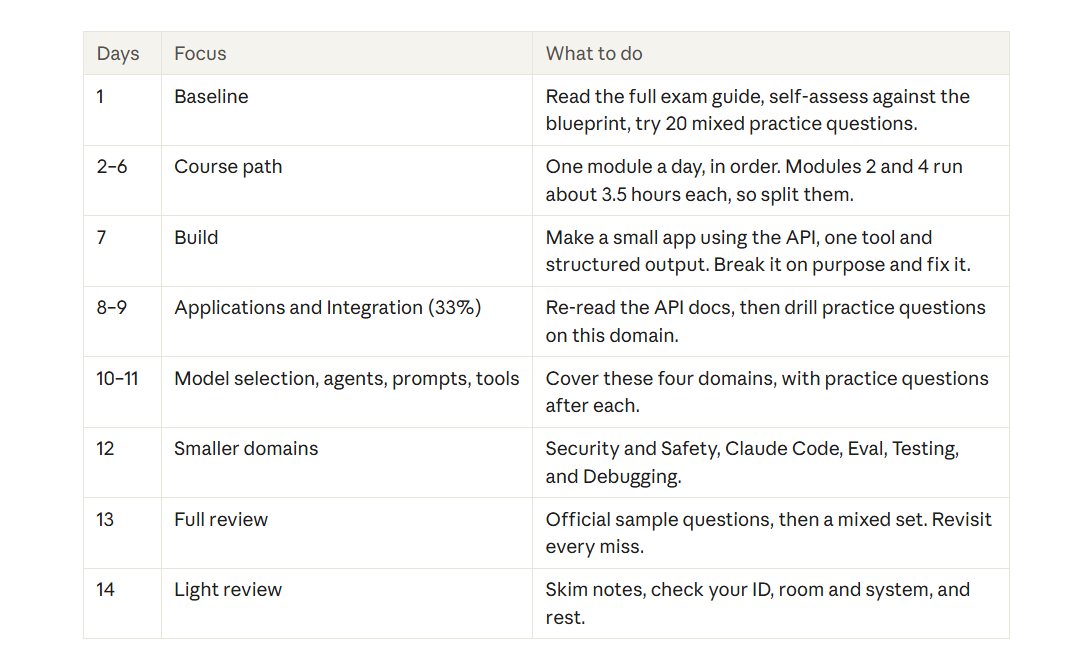
A two-week study plan for Developer – Foundations
If you can spare two to three hours a day, this plan gives you a structure for your preparation.
It's our suggested schedule, not an official Anthropic study plan.
The Developer preparation course takes around 12.9 hours. Some modules run for more than three hours, so split them across sessions rather than rushing through them.
What should you actually build?
Reading about a concept is one thing. Using it is another. The exercises below give you a starting point for putting the course material into practice.
Associate – Foundations
Try building a Claude Project with its own instructions and knowledge sources. Practise writing clear prompts, breaking larger tasks into smaller steps, and checking whether Claude's answers are reliable. You should also understand how to handle sensitive information and when a task needs human review.
Developer – Foundations
Build an application using the Claude API. Include tools and structured output, and practise managing prompts, context, security, and evaluation. The exam guide also covers agents, Claude Code configuration, token and cost management, guardrails, and custom tools or MCP servers.
Architect – Foundations
The official guide outlines several practical exercises:
Build a multi-tool agent that knows when to escalate a task.
Set up a Claude Code team configuration.
Create a structured extraction pipeline.
Build a multi-agent research pipeline.
Build an agent using the Agent SDK.
These exercises cover different parts of the architecture and are worth working through rather than simply reading about.
Architect – Professional
Work on an end-to-end solution that includes retrieval-augmented generation (RAG), evaluation and observability. Practise explaining your decisions around model choice, system integration, architecture and security.
One observation from our team: Claude Code has a relatively small weighting in Developer – Foundations, but the prompting and context skills used alongside it are useful in everyday development. If possible, choose a project that solves a problem you already have. You'll have a reason to finish it, and you'll learn more from working through the problems it creates.
Six mistakes worth avoiding
1. Giving up after a difficult practice test: Some practice questions may feel harder than the real exam. Look at what you got wrong before deciding you’re not ready.
2. Spending equal time on every topic: Applications and Integration account for 33.1% of Developer – Foundations, compared with 3.1% for Claude Code. Plan your time accordingly.
3. Skipping the exam guide: It contains the exam structure, recommended experience, topic weightings, and sample questions. Read it before relying on other resources.
4. Relying on courses alone: This matters particularly for the Architect certifications, where practical experience is important. Anthropic recommends six months or more of relevant building experience for both Architect tracks, with additional production experience for Architect – Professional.
5. Rushing through questions: Read the whole question and check how many answers you need to select. A small detail can change which option is correct.
6. Leaving exam arrangements until the last minute: Check the identification requirements and online proctoring rules in advance. If you're taking the exam remotely, make sure your room and system meet the requirements before exam day.
Quick Answers to Common Questions
How long should I spend preparing?
Our three Developer – Foundations candidates took around one to two weeks, studying two to three hours a day. The course itself takes about 13 hours. If you're new to the Claude API, you'll probably need more time. The Architect exams may require considerably more practical preparation.
Are practice tests enough?
No. Start with the exam guide and course material, then use practice questions to identify what you haven't understood. Practice tests work best as part of your preparation, not as a replacement for it.
Will my score report show what I got wrong?
Your report shows your percentage correct by domain, which can help you identify areas to work on if you retake the exam. Passing depends on your total scaled score: you need at least 720 out of 1,000.
What does the next part cover?
The next part looks at the exam itself, including its format, question types, timing, and what to expect on exam day.
Before you book your exam
You don't need an elaborate study routine. Read the guide, work through the relevant courses, build something you can test, and use practice questions to find the areas that need more attention.
The aim isn't to finish the material as quickly as possible. It's to understand it well enough to apply what you've learned when a question presents you with a problem you haven't seen before.
That's what your preparation time should be spent on.
TL;DR
Preparing for a Claude certification starts with understanding what's covered in your chosen exam. Read the official exam guide, work through Anthropic's free courses, and use practice questions to find topics you need to revisit. For Developer – Foundations, our team spent around one to two weeks preparing for two to three hours a day. Focus more on topics with higher exam weightings, and practise building real applications rather than just memorising answers. Before exam day, review your mistakes, check your exam requirements, and make sure you're comfortable applying what you've learned.
Looking to build a high-performing remote tech team?
Check out MyNextDeveloper, a platform where you can find the top 3% of software engineers who are deeply passionate about innovation. Our on-demand, dedicated, and thorough software talent solutions provide a comprehensive solution for all your software requirements.
Visit our website to explore how we can assist you in assembling your perfect team.