Splitwise’s help centre says that free users can add up to four expenses per day. On a trip, that’s gone by mid-afternoon; you’ve logged breakfast, a cab, and the museum tickets, and the app tells you to come back tomorrow or pay up.
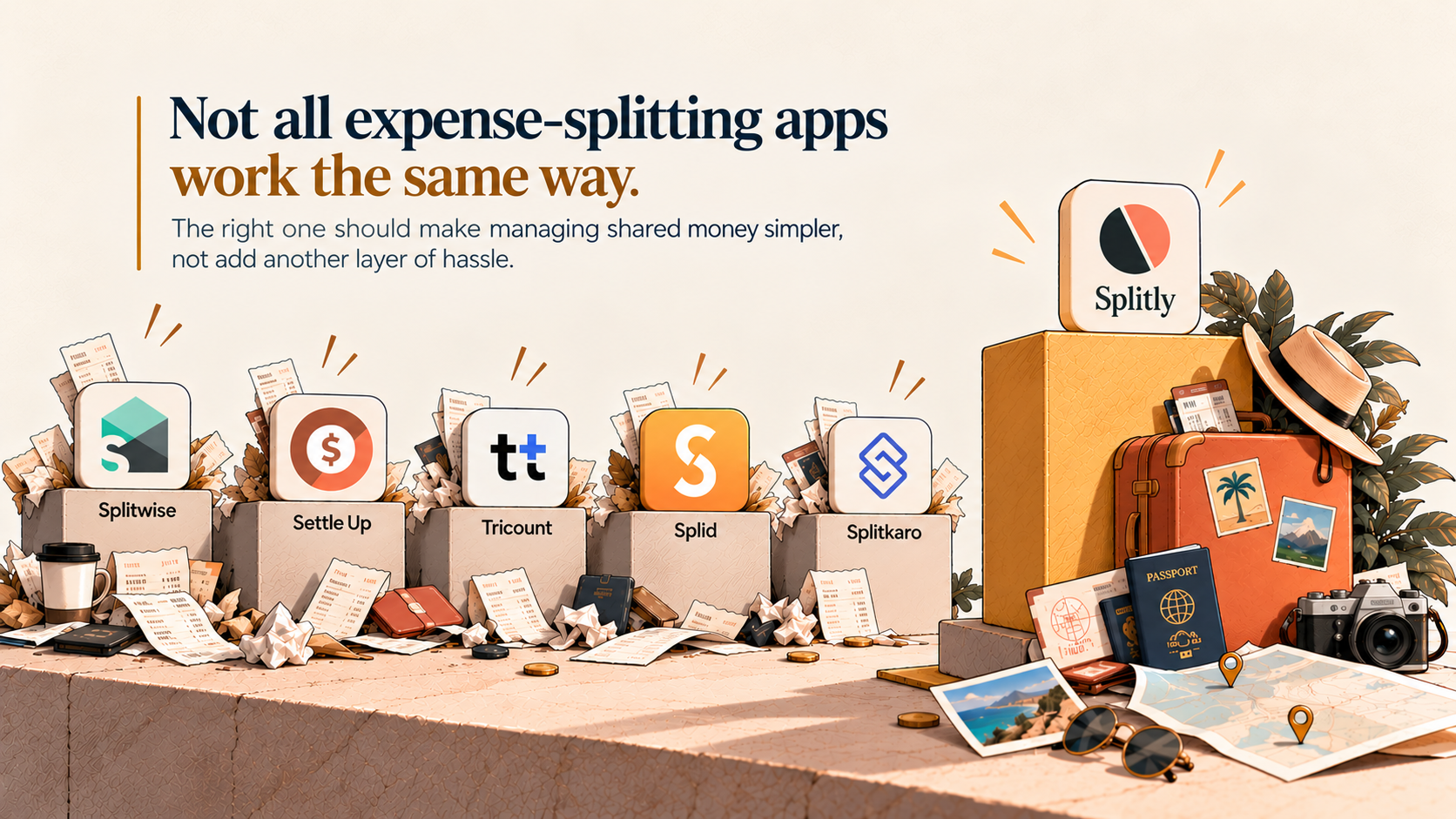
Splitwise, Splitkaro, Tricount, Splid, and Settle Up are the apps people mention most when they split group expenses.
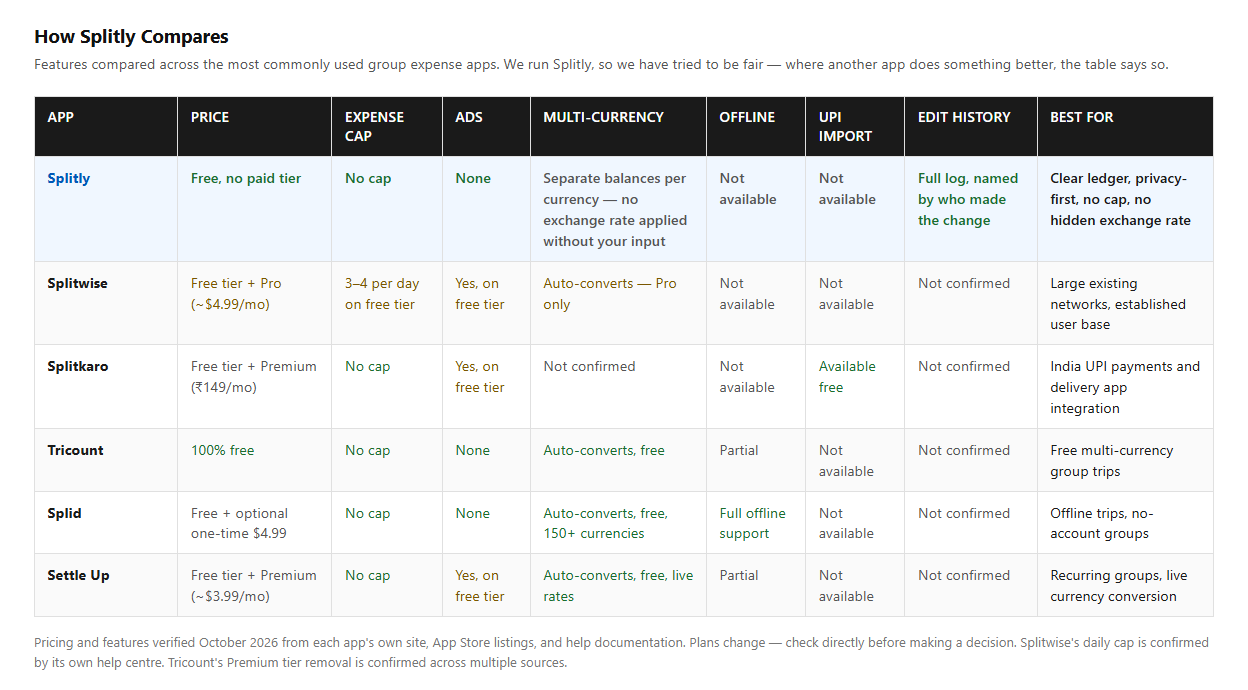
This guide puts each one up against Splitly, the app we run, and makes the case for why you might pick it.
We're not neutral, so we've tried to be fair. Where another app does something better, we say so. For most apps, we read the company's own site or store listing. For Splitwise's price, we had to rely on reviews, because it isn't on their public page. Plans change, so check before you pay.
The short answer
Pick Splitly if you want a group ledger with no cap on expenses, currencies kept separate, a record of every edit, and strict privacy.
Pick something else if you need UPI and delivery-app import (Splitkaro), one converted total (Settle Up or Splid), or offline use without accounts (Splid).
The five apps, and how Splitly compares
Splitwise
Splitwise is the one most people have already heard of, and that counts for a lot. Free accounts get four new expenses a day and see ads, according to its help centre, though a friend in the group can log an expense for you when you run out. Pro removes the cap and costs about $4.99 a month in the US, according to user reviews, so check the app store for your country’s pricing. The Pro page also lists currency conversion, receipt scanning, search, and charts as paid features.
Why Splitly may be the better option: If a daily limit has ever stopped you mid-trip, Splitly is the better pick. It puts no cap on how many expenses or payments you record, so a busy day doesn’t hit a wall. The one thing to weigh is receipt scanning. Splitwise Pro has it, and we don’t list it.
Splitkaro
Splitkaro is built around how people in India pay. Its pricing page says the free plan has unlimited expenses and friends, all six split modes, UPI and card auto-import, and UPI deep-link settling. It can add an expense from a payment in PhonePe, Google Pay, Paytm, or Cred, and pull in orders from Swiggy, Zomato, Blinkit, Zepto, and Instamart, though the order import is limited on the free plan. Premium is ₹149 a month and adds search, custom categories, unlimited receipt scanning, full analytics, and PDF exports. Currencies aren’t mentioned on the pricing page.
Why Splitly may be the better option: If you live on UPI and delivery apps, Splitkaro is the stronger choice, and we’d say so. Splitly is better if you want something smaller and calmer. It only keeps the ledger and never handles your money, and it focuses on a clear edit history and strict privacy. UPI auto-import isn’t on our feature list.
Tricount
Tricount’s own site says “Free. No ads. No limits.” It handles multiple currencies. It’s also part of bunq, the digital bank, which promotes a bunq card inside the app.
Why Splitly may be the better option: Tricount is a good free choice. Splitly is better if you’d rather keep rupees and dollars as separate balances than have them converted, and if you want an app that only keeps the ledger and never handles your money.
Splid
Splid is free to download and needs no sign-up. It works offline and handles more than 150 currencies, converting them automatically. There are optional in-app purchases.
Why Splitly may be the better option: Splid is the better pick for offline use and for one converted total, and offline use isn’t on our feature list. Splitly is better if you want a group history that records every edit with the name of whoever made it, and strict privacy rules, like people being found only by their exact phone number or email.
Settle Up
Settle Up is free with ads. Premium is listed at $3.99 a month on the US App Store and removes the ads, adding receipt photos, recurring expenses, charts, and exports. It supports every currency with live exchange rates and runs on Android, iOS, Windows, and the web.
Why Splitly may be the better option: Settle Up is stronger for multi-currency trips and for more platforms. Splitly is better if you’d rather not have an exchange rate decided for you. You get two clear balances and settle each one yourself.
We wrote “may be the better option” because it depends on what your group needs. Each paragraph names the cases where another app wins. That’s more believable than saying Splitly beats everything, and it keeps every claim on firm ground.
Why people should use Splitly
Here's our case, in the order we think it matters.
No daily cap.
Splitwise's free plan stops at four a day. Splitly doesn't cap how many expenses or payments you record, so a busy trip day doesn't hit a wall. We think a cap is the worst place for a paywall. It lands on the day the app is most useful, and people feel it as a toll.
No hidden exchange rate.
A trip in rupees and dollars shows two balances, never one blended number. Turning one into the other means picking a rate and a date, and we'd rather not pick for you. You decide how to settle each.
A record you can trust.
Edits and deletions stay in the group's history with the name of whoever made them, so a balance can't change without a trace. Every payment also names the balance it settles, whether that's the whole group or just two people.
Privacy by default.
People are found only by their exact phone number or email, never through a partial search, and one person's contact details are never shown to another. Notifications never show an amount. When every balance is zero, you can delete your account. Your personal details go, and the expenses stay as your friends' records.
It never touches your money.
You pay in cash, UPI, or bank transfer, then record it. UPI handled 24.07 billion transactions in September 2026, according to NPCI. Paying a friend is easy now. Remembering what the payment was for is the bit people still get wrong, and that's all Splitly does.
Easy for the whole group.
Add friends by phone number or email, and they don't need an account yet. There are five ways to split, and an expense can have more than one payer. It runs in your browser, and you can add it to your home screen, so there's no app store.
Where Splitly falls short
We'd rather say it than have you find out. Splitly doesn't convert currencies, and receipt scanning, UPI auto-import, spending charts, and offline use aren't on our feature list. If you need those, Splitkaro, Settle Up, and Splid are good choices.
Try it on your next group bill
Make a group, add the first expense, and see if it suits you.
You can start at splitly.mynextdeveloper.com. Splitly is operated by MND Technologies Private Limited, the company behind MyNextDeveloper.
TL;DR
Most group expense apps do the basics well, but they differ in the details. Splitwise’s free plan stops you after four expenses a day. Splitkaro is great if you live on UPI and food delivery. Tricount, Splid, and Settle Up are good free options, and Splid and Settle Up will convert everything into one total for you. Splitly takes a different route. There’s no cap, rupees and dollars stay as separate balances, every edit is recorded with a name, and it never touches your money. It won’t suit everyone, since it doesn’t scan receipts or import UPI payments. If you want a simple, clear ledger for your group, it’s worth a try.
Looking to build a high-performing remote tech team?
Check out MyNextDeveloper, a platform where you can find the top 3% of software engineers who are deeply passionate about innovation. Our on-demand, dedicated, and thorough software talent solutions provide a comprehensive solution for all your software requirements.
Visit our website to explore how we can assist you in assembling your perfect team.