You've chosen your certification, registered, and put in the study hours. Now it's time to understand what actually happens on exam day.
This guide covers the exam format, question types, check-in process, and rules you should know before starting. The information comes from Anthropic's official exam guides, Pearson VUE's published rules, and feedback from three developers on our team who took the Developer – Foundations exam.
Scoring and exam difficulty will be covered in separate posts.
Understanding the Exam Format
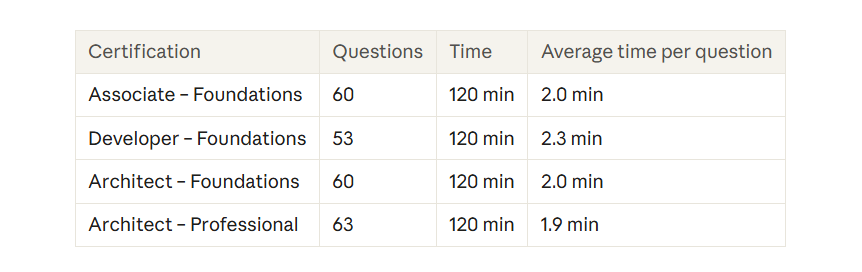
All four Claude certification exams run for 120 minutes and are supervised by Pearson VUE, either online or at a test centre. The main difference is the number of questions, which affects how much time you get for each one.
The exams are closed-book. You pass or fail based on your total score, not how other candidates perform. Before starting, you’ll also need to accept a confidentiality agreement. If you decline, your exam ends, and you may forfeit the fee.
What the Actual Exam Questions Look Like
All four exams use two question types: multiple-choice and multiple-response. Each question tells you how many answers to select, so check that instruction before choosing.
The sample questions in Anthropic's guides follow a simple format: a short scenario, a question, and four options (A to D). The guides also include answer explanations.
Architect – Foundations is slightly different. It uses four randomly selected scenarios from a bank of six, with questions based on those scenarios. You won't know which production situations you'll get beforehand.
Our three developers had different experiences with the Developer exam. One said every question had a single correct answer. Another found practical, sometimes lengthy questions where small details in the scenario mattered. The third felt the exam was mostly theoretical and straightforward.
One candidate estimated that around 40 of the 53 questions were quick to answer, while the rest needed a closer read because the options were quite similar. That's one person's experience, not a guarantee of what you'll see.
The takeaway? Be ready for both direct questions and practical scenarios.
Before the Exam: Get Your Setup Ready
Online check-in can be stressful if you're not prepared. A few simple checks beforehand can save you trouble.
Test your computer:
Run Pearson’s system test well before your exam, then run it again closer to exam day, because passing it isn’t a guarantee. Use the same computer and network that you will use on exam day.
You will need Windows 10 or macOS 14 or newer, a working webcam, a microphone and speakers, and a stable internet connection that has at least 6 Mbps download and 2 Mbps upload.
You have to use one screen, turn off your VPN, and stay away from shared or corporate networks. Close all other applications before you begin.
Check your ID:
Bring an unexpired government-issued photo ID. The name has to be the same as your exam registration. Accepted types are passports, driving licenses, national ID cards, and approved Aadhaar cards. Expired, digital, damaged, and copied IDs are not allowed. Contact Anthropic support before scheduling if your details don’t match.
Prepare your room:
You must be alone in a quiet room, seated at a clear desk. Public places, shared offices, and coffee shops aren't allowed.
Know the check-in window:
Check-in opens 30 minutes before your appointment and closes 15 minutes after it. You’ll sign in, launch the exam software, take a photo of yourself and your ID, and submit four photos of your testing space. A greeter may also ask you to do a 360° scan or show the room from all sides.
Our team's experience matched this process. The ID photo had to be taken in a particular way, and the desk had to be shown from the front, back, and sides.
Need to reschedule?
You can cancel or change your appointment up to 48 hours beforehand. Changes made later, missed appointments, or arriving after the check-in window closes mean losing the exam fee.
During the Exam: Rules and Time Management
Pearson's rules are strict. Stay in view of the webcam and keep your eyes facing forward. Don't talk, read questions aloud, use your phone, wear headphones, or check notes. Paper, pens, and second monitors aren't allowed. An on-screen digital whiteboard is available.
If you run into a technical problem, use the in-exam chat to contact your proctor. Proctors can’t pause or extend your exam or troubleshoot your device or network, so if your computer freezes or disconnects, close and relaunch OnVUE. Breaking the rules can lead to your result being cancelled, your credential being revoked, or a ban from future exams.
What about breaks?
Don't plan on taking one. Not every exam offers breaks, and Anthropic's guide doesn't list any scheduled breaks. Leaving the webcam view without approval could put your exam at risk, so use the bathroom before check-in.
Manage your time.
With roughly two minutes per question, you should have enough time to work through the exam. One of our Developer candidates finished her first pass in about an hour. She still had a full hour left to review her marked answers and never felt short of time.
A simple approach is to:
Answer the questions you're confident about first and mark the uncertain ones.
Return to marked questions and look carefully for important details and the number of answers required.
Change an answer only when you have a clear reason to do so.
What Happens After You Submit?
Your result is a pass or fail. The exam uses a scaled score from 100 to 1,000, with 720 as the passing mark.
Your report also shows your percentage of correct answers in each domain, but those percentages don't determine whether you pass. Your total score does.
Your score appears on screen at the end of your exam, whether you test online or at a test center. A copy of your score report is also emailed to you, and you can find it in your Pearson account under View Score reports.
A passing credential is valid for 12 months. Anthropic issues digital badges through Credly by Pearson. To renew before it expires, you can take a free, non-proctored refresher assessment through Partner Academy.
If you don't pass, you can retake the exam after the waiting period explained in Part 2. Appeals must be submitted through Pearson VUE support within 14 days.
Things You Might Still Be Wondering About
Is the exam open-book?
No. Notes, books, phones, headphones, and second monitors aren't allowed.
Can I take it at a test centre?
Yes. When you schedule through Pearson, you can choose online proctoring or a Pearson VUE test centre.
What if my internet stops working?
Use the in-exam chat to reach your proctor, who can’t pause or extend your exam. If your computer freezes or disconnects, close and relaunch OnVUE. Running the system test beforehand can help prevent problems.
Can I use scratch paper?
No. Paper and pens aren’t allowed in your testing space. An on-screen digital whiteboard is available.
What if my ID name doesn't match my registration?
Contact Anthropic's certification support before scheduling your exam.
What's next?
The next part of this series looks at how Claude certification exams are scored and what the 720 passing mark really means.
A Few Things to Remember Before Exam Day
The exam itself takes two hours, but getting ready for it involves more than studying. A name mismatch, an untested laptop, or a cluttered desk can create problems before you even see the first question.
Sort out the practical details early. That way, when exam day arrives, you can focus on the questions rather than the setup.
TL;DR
All four Claude certification exams last 120 minutes and are conducted through Pearson VUE, either online or at a test centre. This guide explains the question formats, exam-day requirements, ID checks, technical setup, rules, and time-management tips. It also covers what happens after you submit, including results, the 720 passing score, certification renewal, and retakes. A little preparation before exam day can help you avoid unnecessary stress and focus on the questions.
Looking to build a high-performing remote tech team?
Check out MyNextDeveloper, a platform where you can find the top 3% of software engineers who are deeply passionate about innovation. Our on-demand, dedicated, and thorough software talent solutions provide a comprehensive solution for all your software requirements.
Visit our website to explore how we can assist you in assembling your perfect team.