

How Your Codebase Is Slowing Your Team Down
Most times, it’s not folks causing delays — instead, it’s the system they are forced to build inside.
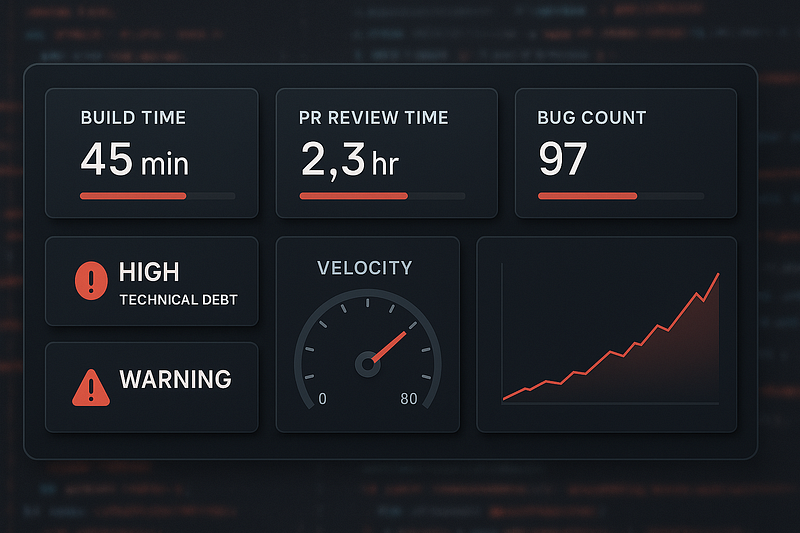
The Invisible Brake On Your Engineering Velocity
Many teams point fingers at slow recruiting, changing priorities, or meetings. Yet studies and real-world numbers hint at a less obvious issue. An unhealthy codebase.
Research in software engineering shows that as programs become more complex, coders slow down over time. A few known frameworks suggest this slowdown isn’t steady. It speeds up as the mess builds.
This suggests your team could actually move fast.
The environment where they operate is the real issue.
Take a closer look at how things slow down, see how it shows up during your day, and notice patterns that repeat. Check what’s actually possible to change instead of guessing. Try small steps that fit real life. Watch for subtle shifts, then adjust before frustration builds.
1. Complication cost. How come basic stuff drags on forever?
Complex software tends to have more bugs, is harder to fix, and slows teams down. Research after research finds tangled code links to higher error counts and tougher upkeep.
This is what you pay for complicated stuff.
You hand it over each time a new thing shows up.
Practical example
A new feature. “Apply coupon” at checkout.
In a tidy setup:
- Change the way orders are handled
- Plug into pricing
- Add tests
- Ship
Time: 1 day.
In a messy setup:
- Three pricing modules
- Confusing signals that stick around forever because no one removes them
- 2,000-line classes
- Fails that happen due to unrelated issues
Time: 3–4 days.
The feature was small. The complexity tax was not.
2. Technical debt. What you owe each sprint
Technical debt isn’t a vague idea.
Industry checks show the same pattern. It slows down growth, increases errors, and piles up over time.
A report highlighted by ITPro suggests businesses waste nearly $370 million annually dealing with legacy systems and accumulated technical debt.
Common signs your crew deals with daily:
- Sprints packed with “stabilisation” tasks
- Tiny tweaks leading to bugs in distant parts — because one fix can break something else entirely
- New hires are wondering why things are put together this way
- Senior engineers guiding rather than building
As years go by, the cost of paying interest on past quick fixes ends up worse than the time they saved back then.
3. Code issues. Tiny warning signs that pile up
Code that’s messy — say, functions running too long, classes doing way too much, or repeated chunks of logic — won’t necessarily crash your project.
Yet studies suggest these tend to create upkeep problems while complicating how we understand the code.
Some feedback points out that these tools don’t always predict well across whole systems, depending on the situation — yet when spotting local issues, they work just fine.
Practical example
A “UserService” document which:
- Authenticates
- Sends email
- Talks with the database
- Formats UI output
Right now, any update affects this file.
Merge conflicts increase.
A login fix messes up email templates.
The problem isn’t your team— blame lies elsewhere.
It is a poor separation of concerns that multiplies effort.
4. Onboarding Drag. Why New Hires Ramp Slowly
Research on coder efficiency often reveals that most of their day is spent exploring, reviewing, or making sense of old code instead of building fresh features. Some research places this at 60–70% of engineering time.
A cluttered code pile makes things harder — progress drags, tension builds.
How it appears
- New engineers waste days wondering — whose job is this anyway? But then they start tracking down answers themselves.
- They’re unsure about messing with the main parts —so they avoid them.
- Senior engineers waste hours explaining old decisions.
- If it takes a person months to start coding without hesitation, the problem’s your messy system — their skill isn’t the issue.
5. Four Clear Signs Your Codebase Is Now The Problem
- Small tweaks mean messing with lots of files. This signals tight coupling.
- Bug fixes mess up different parts. Shows gaps in testing, plus a shaky setup.
- More hires don’t speed things up. Larger teams should move faster. When that’s not happening, tangled workflows are slowing things down.
- Just a handful get how vital parts work. That’s a reliability issue that slows things down.
If this sounds like your crew, they’re basically fighting the system each time they work on the code.
6. What Healthy Codebases Do Differently
From Google to Shopify to Meta, familiar habits appear again and again. These companies, built on solid technical foundations, move in similar ways without copying each other.
They keep things clear while holding a steady flow
Google’s engineering documentation states that the primary purpose of code review is improving the long-term health of the codebase.
Healthy teams:
- Keep functions small
- Stick to common formats while running code checkers
- Enforce clear naming
- Look at how clear it is, not only if it’s right
They check how complex things are, then show it clearly
High-performing teams:
- Track complexity metrics
- Identify where customers struggle as systems grow messy
- Tackle issues by how much they affect the business
This makes refactoring a smart move instead of just being a good-to-have.
They clean up code while building new stuff
Not like some standalone “fix-it” period.
They:
- Fix code a bit every time you work on it — leaving things better than when you found them
- Fix tests — or write new ones — before major updates
- Delete dead code frequently
Little upgrades add up fast.
7. Practical Steps You Can Lead This Quarter
You don’t need it rewritten.
You need a clear way to tidy up.
1. Identify hotspots
Choose the top five parts that change often but cause trouble.
Start there.
2. Put safety rails near key processes
Boost auto checks on checkout, also sign-up, besides payment steps.
Focus improvements on real user flows, not generic fixes.
Safety boosts speed.
3. Shorten pull requests
Small PRs — under 300 lines — get reviewed quicker while cutting down errors.
4. Adopt the Boy Scout Rule
Make every touched file slightly better.
5. Set quiet hours for complex tasks
Complicated scripts, along with frequent task changes, increase delays.
One last thing. The code isn’t just tools — it’s also something people use
Users experience your app. Developers work inside your code.
If the internals break easily, are unclear, and hard to navigate, shipping slows, mistakes rise, and money gets wasted on avoidable issues.
Put effort into clean code.
Set up your crew with a tidier setup to operate in.
Speed goes up when spirits are high — quality tags along.
Looking to build a high-performing remote tech team?
Check out MyNextDeveloper, a platform where you can find the top 3% of software engineers who are deeply passionate about innovation. Our on-demand, dedicated, and thorough software talent solutions provide a comprehensive solution for all your software requirements.
Visit our website to explore how we can assist you in assembling your perfect team.