
The Reason Your AI Outputs Are Terrible
We’ve all seen it — ask an AI something cool, end up with fuzzy nonsense, wrong facts, or answers that feel unfinished. Usually, the bot’s not broken; the way we asked is off. Tweak your questions right, and results jump in quality. This breakdown shows where replies crash—and real fixes using smarter phrasing.
What is Prompt Engineering — and Why It Matters
At its heart, prompt engineering means crafting inputs for AI tools to get results you actually need. It’s like guiding a super-smart intern who takes every word seriously. The prompt must be clear about what you want: task, context, style, format, everything. Use precise details rather than vague ideas to get useful answers.
Good prompt design? Totally necessary. Because it affects how relevant, precise, or clear the AI response turns out. Otherwise, top-tier systems still struggle — simply due to poor setup.
Common Reasons AI Outputs Flop
1. Unclear or confusing prompts
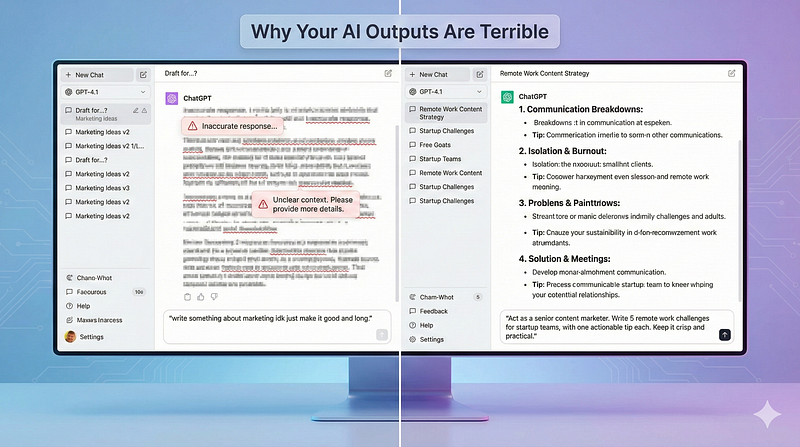
If your request’s too vague — like “talk about marketing” — the output might feel flat or off-track. Without clear goals, purpose, target audience, tone, or limits, the system just fills in blanks on its own. Yet those guesses rarely match what you actually wanted.
Example-
Bad prompt: “Tell me about working from home.”
Better prompt: “List 5 challenges remote workers face when working from home, and provide one practical tip for each. Use bullet points.”
The second prompt clearly defines task, structure, length, and style, giving the AI something concrete to work with.
2. Too many details or confusing instructions
Many people pack way too much into one message — like endless stories, fuzzy ideas, or several tasks at once — which trips up the system. That kind of load can mix things up, go over the word limit, or bury what you actually want.
Example-
Overloaded prompt: “Write a 1,500-word blog about remote work challenges, include graphs, cite 10 sources from 2024–2025 studies, give a summary and conclusion, also add a social-media caption and hashtags.”
Better idea: Split it up. Start by requesting an outline. After that, go for the blog post. Once done, get a social media caption — handle one thing at a time. This makes every step easier to follow.
3. Ignoring role, context, or constraints
Prompts without clear details — say, the target group, preferred tone, or layout — often lead to flat, off-track results. To get better outcomes, shape the setup right from the start using a relatable scenario instead.
Example-
Try this instead of “Write a summary”:
“You are a content marketer writing for young startup founders. Summarize the key challenges faced by first-time founders when hiring, in 5 bullet points.”
This helps the AI understand the audience, role, and format.
4. Relying too much on “few-shot” setups — or piling up tons of samples — can backfire
In the beginning, when LLMs were new, showing a few input-output samples worked well — and using just one or two could guide the model. However, today’s stronger models usually get what you want from clear prompts alone; they don’t need examples. In fact, tossing in extra examples might mess things up, making responses less accurate or skewed.
What does this mean?
Just ’cause you add examples doesn’t mean things get better. Save samples just for tricky jobs.
Try giving straight directions, setting how things should look, or defining limits instead.
5. Failing to tweak or improve prompts now and then
Rarely does a prompt hit right the first time. Because it’s trial and error — test, watch what comes out, then tweak. Most bad results? They come from quitting before finishing.
6. Thinking AI can guess brand-new stuff
Lots of folks think these models understand everything, but really, they just repeat what they have been trained on — or whatever you give them. Because they can’t tap into live updates or secret databases unless told, trying to make them pull facts from thin air usually ends badly. When pushed beyond limits, they tend to fabricate answers without warning. So, expecting fresh or hidden knowledge? That’ll likely backfire.
Example -
“As per the latest 2025 data, estimate how many coding bootcamps exist worldwide.” — Unless you supply an up-to-date dataset, AI will likely hallucinate.
Prompt Engineering: Best Practices That Actually Work
Research, along with real-world testing and shared norms, led to this prompt guide:
- Focus on details. Clearly define the task, its limits, how it should look, the vibe, and who it’s for.
- Give instructions first. Tell the AI exactly what it needs to do. After that, give some background info. That way, the system pays attention better.
- Use role-based framing. Tell the AI who (or what) it should be: e.g., “You are a startup founder writing an article for fellow founders.”
- Apply step-by-step or chain-of-thought prompting for complex tasks. For example: “First outline, then write introduction, then body, then conclusion.”
- Set clear constraints and output format. Word count, bullets, headings, language style, etc. Also, define if you need sources.
- Iterate and refine. Don’t expect perfection — refine based on output. Change one variable at a time: tone, length, context, examples.
- Be aware of model limitations. Don’t expect real-time knowledge, private data access, or infallible accuracy. Use prompts to explicitly ask for sourcing or disclaim uncertainty when needed.
- Keep in mind what the model can’t do. It won’t know things right away, see hidden info, or always get it right. Use prompts to explicitly ask for sourcing or disclaim uncertainty when needed.
How Prompt Defects Cause Real Problems — And How to Avoid Them
A new report called A Taxonomy of Prompt Defects in LLM Systems explains typical errors in prompts that cause weak or risky results. These issues fall into six areas: (1) Specification and Intent, (2) Input and Content, (3) Structure and Formatting, (4) Context and Memory, (5) Performance and Efficiency, and (6) Maintainability and Engineering.
For example:
- If a request isn’t clear, the system might get it wrong — then spit out stuff that doesn’t fit or makes no sense.
- If things get jumbled — say, during long back-and-forth steps — the response might lose track of past data or mix up the flow.
- When memory isn’t handled right, details slip through the cracks instead of linking properly. This can twist meaning without warning, especially if prior info gets dropped mid-task.
- Too many words can go past the limit, so answers might get cut off or messed up.
Figuring out these traps keeps your choices sharp while stopping mix-ups like wanting X but ending up with something totally different.
Real-World Example: Prompt Engineering in Action
Imagine asking an AI to write a LinkedIn update for your new business. One way is weak — another works much better
Bad prompt: “Write a LinkedIn post about our startup.”
Result: Generic, uninspiring, no clear angle or format.
Refined prompt:
“You are a founder of a remote-first tech startup targeting European clients. Write a 150-word LinkedIn post announcing that we just hired 5 new developers. Tone: friendly, optimistic. Include 3 emojis. End with a call-to-action encouraging readers to check our careers page.”
This time you’re spelling things out: role, audience, format, tone, length, purpose. So the result? Probably the one that hits the mark — fresh yet practical.
You can further iterate: Maybe ask next — “Also add 2 relevant hashtags” or “Make the post more casual.”
Why You Might Still Get Bad Output — Even With a Good Prompt
Even if you write prompts the right way, AI can still struggle — its abilities aren’t endless
- Some tasks need external data or live updates — if you don’t share them, the AI could hallucinate.
- Some jobs lack fixed points — so results get fuzzy. But when goals shift, answers drift apart instead.
- Model performance might shift between updates or tries — success today could fail tomorrow. Studies reveal that a prompt doing great on one system often flops on a different one.
- Overuse of examples (few-shot) can backfire, especially with advanced models that already understand instructions.
Final Thoughts — Prompt Like a Pro
GenAI can do a lot. Yet it won’t guess what you’re thinking. When results are weak, look at your input instead of pointing fingers. A sharper setup, packed with clues and direction, leads to answers that actually help. Better framing? Smarter replies.
Treat prompt engineering like something you can learn. Begin with basics, tweak regularly, polish slowly — while keeping the tool’s limits in mind. Over time, your results will shift from dull “whatever” replies to clear, helpful AI-generated stuff — ideal when making blog posts, drafting sales outreach messages, or AI-driven workflows for startups.
Once you learn prompt engineering, AI feels like a solid teammate instead of guesswork.
Looking to build a high-performing remote tech team?
Check out MyNextDeveloper, a platform where you can find the top 3% of software engineers who are deeply passionate about innovation. Our on-demand, dedicated, and thorough software talent solutions provide a comprehensive solution for all your software requirements.
Visit our website to explore how we can assist you in assembling your perfect team.