
This One AI Feature Will Make or Break Your Product in 2026
Most roadmaps these days carry a single common task. Slip AI into the plan.
One year from now, plenty of apps will say they run on artificial intelligence. Still, very few people will actually use those tools much. The reason won’t be poor performance. It also won’t be user resistance. What holds things back is placement — AI sits at the edge, not woven into how work gets done.
Success in 2026 won’t come from one magic AI tool. Shaping outcomes now is how deeply tech fits into the main flow. Built straight into how things work — or just added as a separate layer, which makes it easier to be skipped past.
That gap might seem small at first glance. Yet out in the real world, it decides if artificial intelligence sticks around — or fades into the background.
This blog breaks down why AI-native workflow integration is emerging as the make-or-break capability for products in 2026, and why positioning matters more than technical bragging rights.
AI Add-On vs AI-Native: A Crucial Distinction
A good number of items on the market now come with some kind of AI feature built in.
Most of the products that are available in the market right now come under the category of AI add-ons.
An AI add-on looks something like this:
- There is a chatbot icon in the corner.
- An additional tab with the label “AI Assistant”.
- A prompt box that forces the user to stop what he/she is doing and ask for help.
There is no change in the core workflow. The AI is just next to it.
AI-native products do not operate like that.
- AI is automatically activated and is working in the background during the whole process.
- Suggestions are made right at the time the decision is to be made.
- The user does not request the AI’s assistance. The product provides it in a very smooth way.
What distinguishes the two is not the intelligence of the model. Rather, it is where the intelligence is located.
People often stop using tools that force them to shift focus. If AI seems tacked on, it distracts rather than helps. Instead of blending in, it fights for attention — making tasks harder. Features work better when they fit naturally into how someone already works.
In contrast, AI-native workflows reduce friction. They feel less like “using AI” and more like the product simply becoming smarter.
Why Users Abandon Bolted-On AI Features
Most teams won’t dig around just because a tool has strong AI. They want results fast, focused on what they’re doing right now. Impressive tech alone doesn’t pull them in. What matters is how quickly it helps finish their job. Hidden features? Often ignored. Attention spans are short. Value must show up front, not later. If it feels like extra work, they move on.
Reasons AI tools fall short:
- They require manual prompting, i.e., users must type out every request. This often feels like more work than help.
- They don’t know what the user is doing at the moment.
- They output something universal and generic that is not connected to any particular product’s real data.
- Instead of speeding up the whole process, they slow down the workflow.
Picture a project management tool that uses artificial intelligence to write short task descriptions. When users must switch to another window, copy information over, then sit waiting for results, the function seems like an afterthought. Eventually, people stop using it.
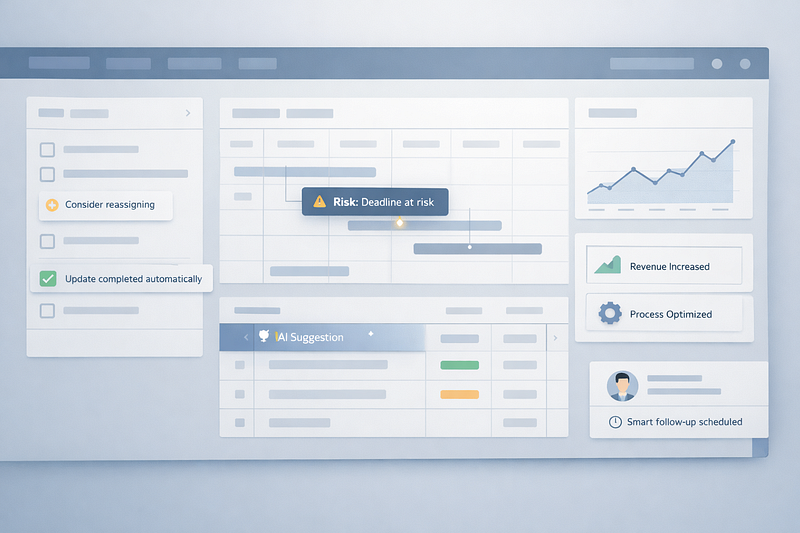
Now, imagine that same tool tracking delayed deadlines, then quietly listing risks — without being asked. When workloads shift, it proposes who should take on tasks instead. No prompts required. Not another interface to figure out.
A different kind of experience shows up here. This one seems less like an AI feature, more like a better product. This happens because people lose interest fast if AI feels like a gimmick instead of something that fits into their daily tasks.
The Features That Actually Matter in 2026
Flashy demos continue to generate excitement for the user, but retention rates have fallen off. The features that are currently important to users are low-key and operational in nature.
Real-Time Decision Support
AI is most effective when there is decision-making going on rather than when it's already done.
Examples:
- A sales tool that identifies potential issues with deals as the representative is actively updating their pipeline.
- A financial application that alerts you to potential cash flow issues as you are creating your budgets.
- A hiring system that identifies potential bias or compliance issues before posting a job listing.
Timing is everything. If the AI reacts too late, it appears as reporting. If the AI acts at the right time, then it will appear as though it is indispensable.
Automation Inside Existing Workflows
Automating workflows works best if users don’t even realize that automation has occurred.
Rather than asking the user what they want to automate, native AI products use behavioral cues to infer intent. Users perform repetitive tasks that trigger background automation. When exceptions occur, they are surfacing, not at every step of the way.
These findings align with workflow automation research studies, which show that users trust automation more when it is performed quietly and predictably within existing processes.
Context Aware Intelligence
Context is the difference between useful AI and simply a cool demo.
Context-aware AI takes into consideration the following items to provide actionable intelligence:
- Role of the user.
- Task at hand.
- Historical data that exists within the product.
- Constraints specific to that organization.
Without context, AI-generated output is generic and does not provide value to the end-user. With context, AI-generated output is actionable and provides value to the end-user.
Users will not accept AI-generated recommendations by 2026 based on the data they have already entered into the product.
Latency, Accuracy, and Explainability Beat Demos
In the early days of AI adoption, the focus was on demonstrations (spectacle). Speed demonstrations. Long-form generation. Eye-catching output.
This stage is coming to an end.
As AI becomes an operational component of the product, the most important characteristics are latency, accuracy, and explainability, rather than novelty.
Latency
If AI-generated responses delay the user's workflow, users will turn off the feature. Even a slight delay can add up significantly when features are utilized dozens of times per day.
Background AI feels like part of the interface. Delayed AI feels like an interruption.
Accuracy
It’s clear now — hallucinations do not belong in real-world systems anymore. If artificial intelligence shapes choices, tiny errors can break confidence fast.
When products lack real-world examples to guide AI responses, trust begins to fade. A system without checks drifts from accuracy. Reliability depends on feedback tied to actual use. Without context-aware rules, results feel disconnected.
Explainability
Users are now asking only one question. “Why did you recommend that?”
Explainability is not about unveiling the model. It is about presenting the reasoning behind product language. Providing clear signals. Highlighting relevant data points. Offering simple indicators of confidence.
User trust will grow significantly when users understand not only what the AI recommends, but also why.
Why Stalling on AI Integration Is Becoming a Competitive Risk
There are many development teams that continue to look at AI as a future update. A future upgrade that can be added after their core product has matured.
That strategy is becoming risky.
Development teams building products without AI-native architecture will encounter:
- Higher integration costs down the road.
- A fragmented user experience.
- Inconsistencies in the way the various product features perform.
- Slower iteration cycles.
At the same time, their competitors are designing workflows with AI in mind since they started developing. Therefore, each time their competitor’s customer interacts with their product, they generate feedback loops that enhance their intelligence and allow them to improve the functionality of their product more rapidly.
It is not a matter of technical superiority. This is a matter of positioning.
Products designed with AI-native architecture are positioned as dynamic, adaptive systems. Products with AI as an add-on are positioned as static tools with optional intelligence.
By 2026, customers will gravitate towards products that seem responsive to changes in market conditions, user behavior, and operational complexities. These expectations are difficult to retrofit into a product.
The Real Make or Break Feature Is Invisible
The irony of the title is intentional.
The AI feature that will either make your product succeed or fail by 2026 is not a headline feature. It is not a new model or interface. The deciding factor will be if AI is integrated so tightly into the workflow that users no longer even notice its presence.
When AI is part of the workflow, it guides decision-making, reduces effort, and quietly instills trust in the users. When AI is an add-on to the product, it is relegated to being shelfware.
Teams that recognize this trend are not simply trying to chase the next trend. They are actively rethinking how value is being provided.
And that, more than any single feature announcement, is what will determine who stays relevant in 2026.
Looking to build a high-performing remote tech team?
Check out MyNextDeveloper, a platform where you can find the top 3% of software engineers who are deeply passionate about innovation. Our on-demand, dedicated, and thorough software talent solutions provide a comprehensive solution for all your software requirements.
Visit our website to explore how we can assist you in assembling your perfect team.