
The Startup Guide to GitHub: Best Practices, Commit Conventions, and Scaling Code
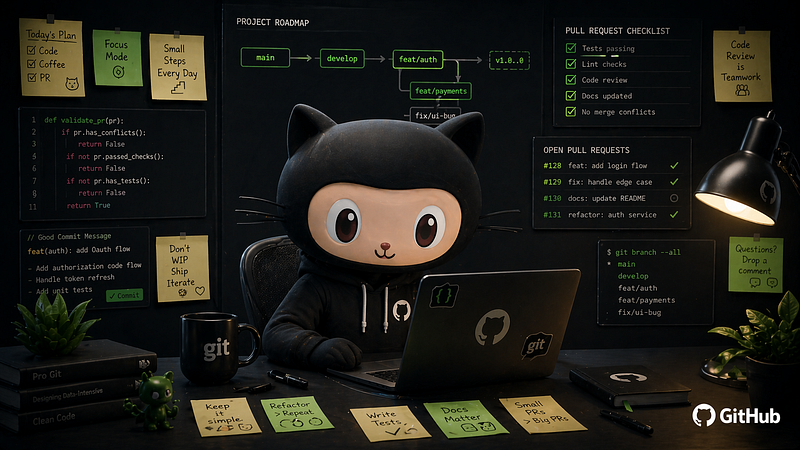
If you’ve ever opened a repo and seen commit messages likefix stuff, asdf, final final v3, you already know the problem. GitHub is the heartbeat of modern software development, but without the right conventions, it quickly becomes a liability instead of an asset.
This guide covers what good GitHub hygiene actually looks like from a tech startup POV: practical, opinionated, and built to scale.
Why GitHub Best Practices Matter for Startups
Speed is everything at a startup, but speed without structure creates the kind of debt that slows your next sprint, onboards engineers badly, and makes debugging a nightmare at 2 am.
The business case is clear: Microsoft’s studies showed that reviewed code had 20–30% fewer defects reaching production. SmartBear’s analysis of 2,500 code reviews found that reviews caught 60–90% of defects before they left development. That’s not a marginal gain; that’s a competitive edge.
Commit Naming Conventions: What Should a Good Commit Message Look Like?
A commit message is documentation. It answers why a change was made, not just what changed. The diff already handles the what.
Bad: fixed bug.
Good: fix(auth): resolve session timeout on Safari mobile.
The second tells a reviewer exactly where to look, what the problem was, and what changed in under 72 characters.
The Conventional Commits Standard
The most widely adopted commit format follows this pattern: <type>(<scope>):<short description>,with an optional body and footer.
In addition to those, test means adding or updating tests, choremeans doing maintenance tasks like build scripts and CI config, perfmeans a performance improvement, and revertmeans going back to a previous commit.
Real examples:
- feat(payments) — add Stripe webhook for subscription renewal.
- fix(dashboard) — correct NaN display when the user has no transactions.
- docs(readme) — update local setup instructions for M1 Mac.
- refactor(api) — extract validation logic into shared middleware.
Q: Should commit messages use past or present tense?
Use the imperative mood, as if giving an instruction. A properly formed subject line should complete the sentence: “If applied, this commit will…” So: Add login page, not Added login page.
Q: How long should a commit message be?
Aim for 50 characters in the subject line; treat 72 as the hard limit. GitHub truncates anything over 72 with an ellipsis. If more context is needed, add a body separated by a blank line and explain what and why, not how.
Branch Naming Conventions: How Should We Organise Our Repository?
Use the pattern: <type>/<short-description>, for example: feature/user-onboarding-flow,bugfix/fix-login-redirect,or hotfix/patch-payment-gateway-crash.
Always use kebab-case: bugfix/fix-login-issue is more readable than bugfix/fixLoginIssue. Keep names short but meaningful. If your team uses Jira or Linear, include the ticket ID: feature/PROJ-123-footer-navigation as this links the code to your issue tracker automatically.
At a minimum, every startup repo should have main(production-ready), develop(integration branch), and short-lived feature/fix branches. Avoid letting feature branches live longer than a sprint.
Pull Requests: How to Write PRs That Actually Get Reviewed
Aim to create small, focused pull requests that fulfil a single purpose. A good rule of thumb: if your PR touches more than 400–500 lines of meaningful logic, consider splitting it. For large features that can’t be split, use draft PRs to share early work and get incremental feedback.
Write clear titles and descriptions. In the PR body, always include what changed, why it matters, and how to test it. A PR template in your .github folder pre-fills this structure for every developer automatically and removes the back-and-forth of asking for context that should have been there from the start.
Reviewers should aim to start within two hours of submission. The longer the wait, the more likely the author has moved on, and context-switching back is expensive for everyone.
Code Review: What Does Good Code Review Look Like?
Code review is not about gatekeeping; it’s the single most effective quality mechanism a team has.
As a reviewer: pull the branch locally, build it, and test beyond the happy path, try to trigger edge cases. Separate blocking issues (bugs, security flaws) from optional suggestions, and be explicit about which is which. Reviews shouldn’t only flag mistakes; acknowledging a good approach goes a long way.
As an author, review and test your own PR before submitting it and respond to every comment, even just to acknowledge it.
For style debates, don’t let them happen in review threads; rather, resolve them with linters and formatters upfront. Set up GitHub Actions to run your test suite on every PR so issues surface before a human ever looks at the code.
Branch Protection and the .github Folder
Protect mainalways. Require at least one approving review, all CI checks to pass, and disable force pushes. This is non-negotiable for any team serious about stability.
And make full use of your .github folder. Beyond Actions workflows, it can hold PR templates, issue templates, and a CODEOWNERS file that auto-assigns reviewers based on file paths so the right person is always looped in without anyone having to think about it.
Final Thoughts
GitHub best practices aren’t bureaucracy; they’re the scaffolding that lets your team move faster with fewer mistakes. Every hour spent untangling a messy commit history is an hour not spent on product.
Start small: agree on a commit convention, protectmain, and add a PR template. The rest compounds from there.
TL;DR
We use a way of writing commit messages like feat:and fix:, and we name our branches with dashes and ticket numbers. This helps us find things easily and be open about what we’re doing. We keep pull requests and use automated checks to make it easier for people to review our work.
This makes it less stressful for everyone. These aren’t rules; they’re how we work to avoid problems at the last minute. When we follow these standards, new team members can start working right away. We do all this to keep our Git process organised so we can work quickly and grow without problems.
Looking to build a high-performing remote tech team?
Check out MyNextDeveloper, a platform where you can find the top 3% of software engineers who are deeply passionate about innovation. Our on-demand, dedicated, and thorough software talent solutions provide a comprehensive solution for all your software requirements.
Visit our website to explore how we can assist you in assembling your perfect team.